Detecting Excessive LNK Argument Padding

A Windows shortcut file (.lnk) carries command-line arguments that get passed to the target program when the shortcut runs. The arguments field accepts whitespace characters. The Properties dialog in Windows Explorer has a limited visible area for displaying those arguments to anyone inspecting the file. By padding the arguments with a long run of whitespace before the meaningful portion of the command, the meaningful portion gets pushed outside what the dialog shows. A user looking at the shortcut sees an empty or innocuous arguments field. The shortcut still runs the full command, padding included, when clicked.
This is not a memory corruption bug or a code execution flaw. An attacker is putting whitespace into a field that accepts whitespace, and Windows displays that whitespace exactly as it always has. The technique abuses a display limitation rather than a vulnerability in any conventional sense. It was tracked publicly as ZDI-CAN-25373 and later as CVE-2025-9491, but Microsoft initially declined to treat it as something needing servicing, because technically nothing is broken. The padding passes through to the running process regardless of any rendering changes to the Properties dialog, which is what makes this detectable through normal process logs.
The technique has been documented in public reporting against around a thousand malicious .lnk samples with use dating back to at least 2017. APT groups from North Korea (including APT37 and Konni), Iran, Russia (including Evil Corp), and China (including UNC6384) have been observed using it. The technique is well-documented and straightforward to reproduce locally for testing.
The hidden command does not stay hidden once the shortcut runs. Windows passes the entire arguments string, padding and all, to the target program. Process creation events from any EDR capture that command line at the point of process creation. A 500-character run of spaces in front of /c powershell -ep b calc is invisible in Explorer's Properties dialog and very visible in process logs.
Building the padded shortcut
To reproduce the technique locally, the following PowerShell creates a shortcut on the desktop with a unique, identifiable name, pads its arguments with 500 spaces before the real command, and runs it. The shortcut targets cmd.exe (left unqualified so the OS resolves it, which keeps the visible portion of the Target field short and free for the whitespace to show), and uses cmd to launch PowerShell. The unique filename avoids races with other cleanup operations and makes the artifact easy to find by name if manual cleanup is needed. Each line ends in a semicolon so the block can be pasted into a PowerShell prompt and executed as a single statement.
$ShortcutPath = "$env:USERPROFILE\Desktop\lnk_padding_test_d8f4a2.lnk";
$WshShell = New-Object -ComObject WScript.Shell;
$Shortcut = $WshShell.CreateShortcut($ShortcutPath);
$Shortcut.TargetPath = "cmd.exe";
$space = ' ' * 500;
$Shortcut.Arguments = "$space /c powershell -ep b calc";
$Shortcut.Description = "LNK padding test - safe to delete";
$Shortcut.Save();
Start-Process $ShortcutPath;
The shortcut launches cmd.exe, which in turn runs PowerShell with -ep b calc (shorthand for -ExecutionPolicy Bypass followed by launching the calculator). A rule keyed on calc or powershell substrings alone would not recognize the whitespace as the indicator. Start-Process produces the same command line in process logs as a double-click would. The Description field is metadata, not part of the command line, and does not appear in process events.
To clean up the test shortcut when done, the following removes it:
Remove-Item "$env:USERPROFILE\Desktop\lnk_padding_test_d8f4a2.lnk" -Force;Keeping the cleanup separate from the build-and-run lets a researcher inspect the file with the responder script in the next section before removing it.
What it looks like in process logs
When the shortcut runs, the process creation event records the command line at the point of process creation. The 500 spaces are right there in the middle, between the image path and the meaningful arguments.
| Field | Value |
|---|---|
| Image | C:\Windows\System32\cmd.exe |
| Command line | cmd.exe, then 500 consecutive space characters, then /c powershell -ep b calc |
| Longest run of consecutive whitespace | 500 |
| Parent process | Typically explorer.exe when the shortcut is double-clicked |
The whitespace is in the process record at the point of creation. Detection rules that match against the command-line field see the full run of spaces.
What the user sees
The Properties dialog in Windows Explorer is what a user inspects when they right-click a shortcut to verify what it does. The dialog has a fixed visible area for the Target field. With cmd.exe as the unqualified target and 500 spaces sitting in front of the real arguments, the visible portion shows cmd.exe followed by whitespace, with the meaningful command hidden past the cutoff.
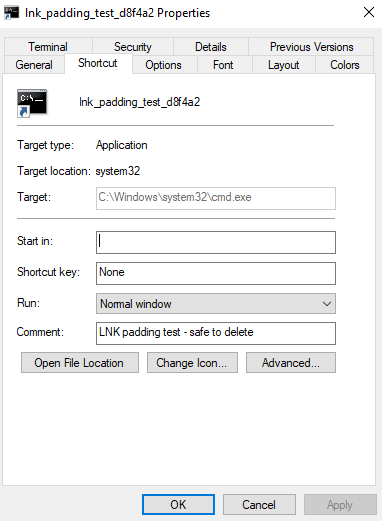
The target is cmd.exe, which on its own does not raise alarm. The whitespace fills the rest of the visible portion. The arguments that follow the padding never reach the visible area, so the user sees no sign that anything is appended. The shortcut runs the full command anyway when clicked.
Inspecting the shortcut as a responder
When a suspicious .lnk file is recovered (from email, a network share, a recently used folder, a sandbox) the responder needs to see its full contents without launching it.
$Path = "$env:USERPROFILE\Desktop\lnk_padding_test_d8f4a2.lnk";
$WshShell = New-Object -ComObject WScript.Shell;
$Shortcut = $WshShell.CreateShortcut($Path);
$Args = $Shortcut.Arguments;
$FileInfo = Get-Item $Path;
$Hash = (Get-FileHash $Path -Algorithm SHA256).Hash;
$LongestRun = if ($Args -match '[\s\xA0\u00A0\u1680\u2000-\u200B\u2028\u2029\u202F\u205F\u3000\uFEFF]+') { ($Matches[0]).Length } else { 0 };
$TotalWs = ([regex]::Matches($Args, '[\s\xA0\u00A0\u1680\u2000-\u200B\u2028\u2029\u202F\u205F\u3000\uFEFF]')).Count;
[PSCustomObject]@{
    Path                 = $Path
    FileSizeBytes        = $FileInfo.Length
    SHA256               = $Hash
    Target               = $Shortcut.TargetPath
    WorkingDirectory     = $Shortcut.WorkingDirectory
    Description          = $Shortcut.Description
    ArgumentsLength      = $Args.Length
    LongestWhitespaceRun = $LongestRun
    TotalWhitespaceChars = $TotalWs
    Arguments            = $Args
} | Format-List;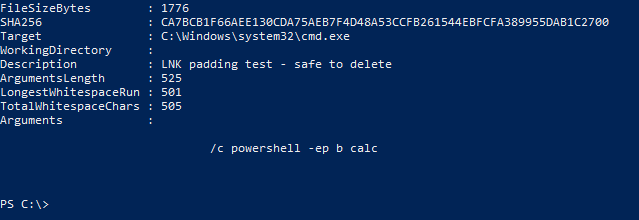
This script reads the shortcut without executing it. It does not invoke Start-Process and does not resolve the target. A responder can run it against a quarantined .lnk file safely.
The detection signal
A process creation event with a command line containing a long run of consecutive whitespace characters is the signal. Command lines in normal use rarely contain more than a handful of consecutive whitespace characters between tokens. Real-world samples produce runs of dozens to hundreds, sometimes thousands.
Public reporting on documented samples lists six ASCII whitespace bytes used in the padding. The arguments field in a .lnk file is stored as Unicode text, which means the file format can carry many other whitespace characters beyond these six. A regex that includes those Unicode characters covers a wider theoretical surface without adding false positive risk, since legitimate command lines do not contain long runs of them either.
| Token | What it catches |
|---|---|
\s | Standard ASCII whitespace. Space, horizontal tab, line feed, vertical tab, form feed, carriage return. |
\xA0 | Non-breaking space. |
\u1680 | Ogham space mark. |
\u2000-\u200B | A block of Unicode whitespace including various widths of space and the zero-width space at U+200B. |
\u2028 | Line separator. |
\u2029 | Paragraph separator. |
\u202F | Narrow no-break space. |
\u205F | Medium mathematical space. |
\u3000 | Ideographic space, used in CJK text. |
\uFEFF | Byte order mark, also known as zero-width no-break space. |
The threshold separates routine spacing from intentional padding. Scripts that align output with multiple spaces rarely produce more than a handful of consecutive whitespace characters in a single run. Manually constructed command lines typically have one or two spaces between tokens. A run of 10 or more consecutive whitespace characters is outside the range of what normal command-line construction produces. 10 is a reasonable starting threshold.
The detection rule
The rule is a regex match against the command line of every process creation event. Match means alert.
| Step | What |
|---|---|
| 1. Source | Process creation events from any EDR or process auditing pipeline. |
| 2. Field | The full command line, including the image path and arguments. |
| 3. Match | Regex [\s\xA0\u00A0\u1680\u2000-\u200B\u2028\u2029\u202F\u205F\u3000\uFEFF]{10,} against the command line. |
| 4. Alert | On match, emit the event with the command line, the parent process, and the longest whitespace run length as fields. |
The regex covers ASCII whitespace plus a wider set of Unicode whitespace characters as defensive coverage.
The detection pattern
Any process creation matching the regex above alerts every time. The technique is rare enough in legitimate usage that the rule produces strong signal on its own. A targeted alert on this rule fires with a low false positive rate in most environments.
